
Troubleshooting LiftMaster Operator Error Codes - DDM Garage Doors
Engineers at the Chamberlain Group have designed their LiftMaster operators with error codes that reduce the time required to troubleshoot and repair equipment.
Operator product manuals cover a variety of error codes. In this video, we cover the four major problems that occur in an estimated 80% of operator failures.
- The light marked MAS (Maintenance Alert System) blinks twice in a row. This code indicates that the clutch is slipping. This is usually due to something obstructing the door. For example, a broken spring, bent tracks, or a bent or damaged door could all trigger this error code.
- The light marked MAS flashes four times in a row. This indicates that the RPM sensor has detected an error. Some possible reasons for this error code include bent tracks, a damaged or disconnected RPM sensor, or an obstruction that keeps the door from closing.
- The light marked MAS blinks eight times in a row. This error code indicates there has been a brown-out. See this video for more information about how to check the voltages.
- The light marked LMEP (LiftMaster Entrapment Protection) flashes steadily. This error code indicates one of the wires to the photo eyes has been disconnected, or that the eye has been damaged. See our previous video for how to troubleshoot photo eyes.
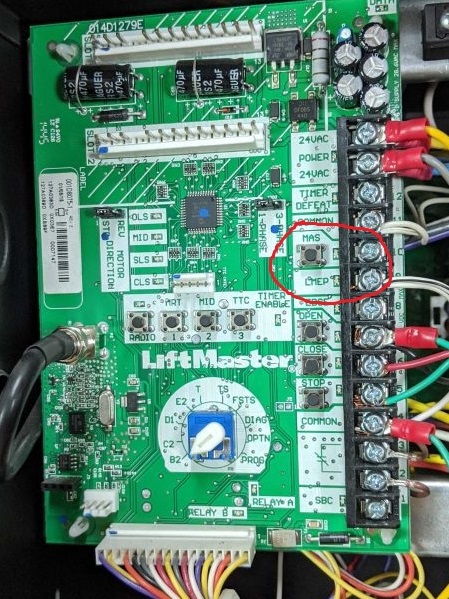
In order to reset the control board, first cut power to the operator. Then, find the button marked MAS. Press and hold for five seconds to reset the board.
To troubleshoot other error codes, check the LiftMaster operators’ manual.
Our blog titled “Functions of a LiftMaster Logic 5 Control Board” contains additional information about the operations of the LiftMaster operator.